Hallo Comunity,
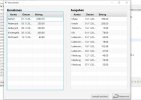
ich habe eine TableView mit 3 Columns. Irgendwie wird aber eine 4. leere mitgeneriert, der mir Platz wegnimmt.
Meine Gui-Klasse mit den TableView- und Column-Objekten
1. Frage: Wieso wird eine vierte Column zusätlich generiert und wie kann ich die wegmachen?
2.Frage: Wie kann ich die Column-Breite auf den größten Column-Inhalt automatisch anpassen?
ich habe eine TableView mit 3 Columns. Irgendwie wird aber eine 4. leere mitgeneriert, der mir Platz wegnimmt.
Meine Gui-Klasse mit den TableView- und Column-Objekten
Java:
package gui;


import conVar.CVMain;
import conVar.CVSubEdit;
import handler.ConEdit;
import javafx.geometry.Insets;
import javafx.geometry.Orientation;
import javafx.geometry.Pos;
import javafx.scene.Scene;
import javafx.scene.control.Button;
import javafx.scene.control.ContentDisplay;
import javafx.scene.control.Separator;
import javafx.scene.control.TableColumn;
import javafx.scene.control.TableView;
import javafx.scene.control.cell.PropertyValueFactory;
import javafx.scene.image.Image;
import javafx.scene.image.ImageView;
import javafx.scene.layout.BorderPane;
import javafx.scene.layout.HBox;
import javafx.scene.layout.Priority;
import javafx.scene.layout.VBox;
import javafx.scene.text.Text;
import util.BookingObj;
import util.MyTooltip;


public class GEdit {

    private BorderPane layout;
    private Scene sceneGEdit;
    private ConEdit conEdit;


    private Text txtInTV;
    private Text txtOutTV;

    private TableView<BookingObj> inTV;
    private TableColumn<BookingObj, String> inAccountCol;
    private TableColumn<BookingObj, String> inDateCol;
    private TableColumn<BookingObj, String> inAmountCol;

    private TableView<BookingObj> outTV;
    private TableColumn<BookingObj, String> outAccountCol;
    private TableColumn<BookingObj, String> outDateCol;
    private TableColumn<BookingObj, String> outAmountCol;

    private Separator separator;

    private ImageView iconBack;
    private Button btnBackToStart;
    private Button btnSave;


    public GEdit(ConEdit conEdit) {
        layout = new BorderPane();
        sceneGEdit = new Scene(layout, CVMain.lyotSizeX, CVMain.lyotSizeY);
        this.conEdit = conEdit;

        txtInTV = new Text(CVSubEdit.inTVTxt);
        txtOutTV = new Text(CVSubEdit.outTVTxt);

        inTV = new TableView<BookingObj>();
        inAccountCol = new TableColumn<BookingObj, String>("");
        inDateCol = new TableColumn<BookingObj, String>("");
        inAmountCol = new TableColumn<BookingObj, String>("");

        outTV = new TableView<BookingObj>();
        outAccountCol = new TableColumn<BookingObj, String>();
        outDateCol = new TableColumn<BookingObj, String>();
        outAmountCol = new TableColumn<BookingObj, String>();

        separator = new Separator();


        iconBack = new ImageView(new Image(getClass().getResourceAsStream("../icons/EditBack32.png")));
        btnBackToStart = new Button(CVSubEdit.btnBackToStartTxt);

        btnSave = new Button();

        setObjects();
        setLayout();


    }//constructor


    @SuppressWarnings("unchecked")
    private void setObjects() {

        //****** Texts ******
        txtInTV.setFont(CVSubEdit.bold18);
        txtOutTV.setFont(CVSubEdit.bold18);

        //****** TableViews and ther Columns ******
        inAccountCol.setText(CVSubEdit.inAccountTxt);
        inAccountCol.setStyle("-fx-font-size: 15; -fx-alignment: CENTER-LEFT;");
        inDateCol.setText(CVSubEdit.inDateTxt);
        inDateCol.setStyle("-fx-font-size: 15; -fx-alignment: CENTER;");
        inAmountCol.setText(CVSubEdit.inAmountTxt);
        inAmountCol.setStyle("-fx-font-size: 15; -fx-alignment: CENTER-RIGHT;");

        outAccountCol.setText(CVSubEdit.outAccountTxt);
        outAccountCol.setStyle("-fx-font-size: 15; -fx-alignment: CENTER-LEFT;");
        outDateCol.setText(CVSubEdit.outDateTxt);
        outDateCol.setStyle("-fx-font-size: 15; -fx-alignment: CENTER;");
        outAmountCol.setText(CVSubEdit.outAmountTxt);
        outAmountCol.setStyle("-fx-font-size: 15; -fx-alignment: CENTER-RIGHT;");

        //to branding the columns for instans-variables from BookingObj
        inAccountCol.setCellValueFactory(new PropertyValueFactory<BookingObj, String>("sourceAccount"));
        inDateCol.setCellValueFactory(new PropertyValueFactory<BookingObj, String>("date"));
        inAmountCol.setCellValueFactory(new PropertyValueFactory<BookingObj, String>("amount"));
        outAccountCol.setCellValueFactory(new PropertyValueFactory<BookingObj, String>("sourceAccount"));
        outDateCol.setCellValueFactory(new PropertyValueFactory<BookingObj, String>("date"));
        outAmountCol.setCellValueFactory(new PropertyValueFactory<BookingObj, String>("amount"));

        inTV.getColumns().addAll(inAccountCol, inDateCol, inAmountCol);
        outTV.getColumns().addAll(outAccountCol, outDateCol, outAmountCol);

        VBox.setVgrow(inTV, Priority.ALWAYS);
        VBox.setVgrow(outTV, Priority.ALWAYS);


        //****** Seperator ******
        separator.setOrientation(Orientation.VERTICAL);
        separator.setPadding(new Insets(50,0,25,0));
        VBox.setVgrow(separator, Priority.ALWAYS);

        //****** Buttons ******
        btnBackToStart.setGraphic(iconBack);
        btnBackToStart.setContentDisplay(ContentDisplay.LEFT);
        btnBackToStart.setTooltip(new MyTooltip(CVSubEdit.ttBtnToStart));
        btnBackToStart.setOnAction(conEdit);

        btnSave.setText("manuell speichern");
        btnSave.setOnAction(conEdit);

    }//setObjects


    private void setLayout() {

        VBox vBoxCenterLeft = new VBox();
        VBox vBoxCenterRight = new VBox();
        VBox vBoxCenterMiddle = new VBox();
        HBox hBoxCenter = new HBox();

        //****** for BorderPane-TOP ******

        //****** for BorderPane-CENTER_LEFT_TOP ******

        //****** for BorderPane-CENTER_LEFT ******
        vBoxCenterLeft.getChildren().addAll(txtInTV, inTV);
        vBoxCenterLeft.setPadding(new Insets(20));
        HBox.setHgrow(vBoxCenterLeft, Priority.ALWAYS);

        //****** for BorderPane-CENTER_RIGHT_TOP ******

        //****** for BorderPane-CENTER_RIGHT ******
        vBoxCenterRight.getChildren().addAll(txtOutTV, outTV);
        vBoxCenterRight.setPadding(new Insets(20));
        HBox.setHgrow(vBoxCenterRight, Priority.ALWAYS);

        //****** for BorderPane-CENTER_Middle ******
        vBoxCenterMiddle.getChildren().addAll(separator);

        //****** for BorderPane-CENTER - merging privious Boxes ******
        hBoxCenter.getChildren().addAll(vBoxCenterLeft, vBoxCenterMiddle, vBoxCenterRight);

        //****** for BorderPane-BOTTOM ******

        //BorderPane.setAlignment(btnBackToStart, Pos.CENTER_RIGHT);

        HBox hBoxBottom = new HBox(20);
        hBoxBottom.setAlignment(Pos.CENTER_RIGHT);
        BorderPane.setAlignment(hBoxBottom, Pos.CENTER_RIGHT);
        hBoxBottom.getChildren().addAll(btnSave, btnBackToStart);

        //Top

        //Left

        //Right

        //Center
        layout.setCenter(hBoxCenter);

        //Bottom
        layout.setBottom(hBoxBottom);

    }//setLayout


    public TableView<BookingObj> getInTV() {
        return inTV;
    }

    public TableView<BookingObj> getOutTV() {
        return outTV;
    }

    public TableColumn<BookingObj, String> getInAccountCol() {
        return inAccountCol;
    }

    public TableColumn<BookingObj, String> getInDateCol() {
        return inDateCol;
    }

    public TableColumn<BookingObj, String> getInAmountCol() {
        return inAmountCol;
    }

    public TableColumn<BookingObj, String> getOutAccountCol() {
        return outAccountCol;
    }

    public TableColumn<BookingObj, String> getOutDateCol() {
        return outDateCol;
    }

    public TableColumn<BookingObj, String> getOutAmountCol() {
        return outAmountCol;
    }

    public Scene getScEdit() {
        return sceneGEdit;
    }

    public Button getBtnBackToStart() {
        return btnBackToStart;
    }


    public Button getBtnSave() {
        return btnSave;
    }

}//class
1. Frage: Wieso wird eine vierte Column zusätlich generiert und wie kann ich die wegmachen?
2.Frage: Wie kann ich die Column-Breite auf den größten Column-Inhalt automatisch anpassen?