
Hallo, ich habe einen JSON-Code und möchte, dass das Aufklappmenü erst angezeigt wird, sobald man auf den Pfeil klickt.
Vielleicht kann mir jemand helfen. Vielen Dank!
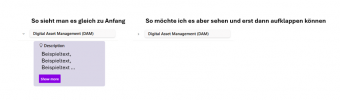
Vielleicht kann mir jemand helfen. Vielen Dank!
JSON:
{
  "$schema": "[URL]https://developer.microsoft.com/json-schemas/sp/v2/row-formatting.schema.json[/URL]",
  "hideSelection": true,
  "hideColumnHeader": true,
  "hideListHeader": true,
  "groupProps": {
    "headerFormatter": {
      "elmType": "div",
      "attributes": {
        "class": "sp-row-card"
      },
      "style": {
        "color": "black",
        "background-color": "#FAF9F9",
        "flex-grow": "1",
        "display": "flex",
        "flex-direction": "row",
        "box-sizing": "border-box",
        "padding": "4px 8px 5px 8px",
        "border-radius": "6px",
        "align-items": "center",
        "flex-wrap": "nowrap",
        "overflow": "auto",
        "margin": "1px 4px 4px 1px"
      },
      "children": [
        {
          "elmType": "img",
          "style": {
            "max-width": "24px",
            "max-height": "24px",
            "margin-top": "2px",
            "border-radius": "2px"
          }
        },
        {
          "elmType": "div",
          "children": [
            {
              "elmType": "span",
              "style": {
                "padding": "5px 5px 5px 5px",
                "font-weight": "500",
                "font-size": "15px"
              },
              "txtContent": "@group.fieldData.displayValue"
            }
          ]
        },
        {
          "elmType": "div",
          "children": [
            {
              "elmType": "div",
              "style": {
                "display": "flex",
                "flex-direction": "column",
                "justify-content": "center"
              }
            }
          ]
        }
      ]
    }
  },
  "rowFormatter": {
    "elmType": "div",
    "attributes": {
      "class": "ms-bgColor-themeLighterAlt"
    },
    "style": {
      "justify-content": "start",
      "color": "ms-fontColor-Primary",
      "display": "flex",
      "padding": "1px 8px 5px 20px",
      "border-radius": "6px",
      "max-width": "905px",
      "margin": "1px 4px 4px 60px"
    },
    "children": [
      {
        "elmType": "div",
        "style": {
          "text-align": "left",
          "font-weight": "400",
          "font-size": "15px"
        },
        "children": [
          {
            "elmType": "span",
            "style": {
              "margin-top": "8px",
              "padding-left": "1px",
              "color": "black"
            },
            "attributes": {
              "class": "ms-fontSize-m",
              "iconName": "Lightbulb"
            }
          },
          {
            "elmType": "span",
            "attributes": {
              "class": "sp-row-listPadding"
            },
            "txtContent": "Description",
            "style": {
              "font-weight": "500",
              "color": "black",
              "padding-left": "4px"
            }
          },
          {
            "elmType": "div",
            "attributes": {
              "class": "sp-row-listPadding"
            },
            "txtContent": "[$Answer]",
            "style": {
              "flex-grow": "1",
              "display": "flex",
              "flex-direction": "column",
              "flex-wrap": "nowrap",
              "align-items": "center",
              "max-width": "900px",
              "min-width": "205px",
              "margin-top": "8px",
              "margin-bottom": "8px"
            }
          },
          {
            "elmType": "button",
            "customRowAction": {
              "action": "defaultClick"
            },
            "txtContent": "Show more",
            "attributes": {
              "class": "sp-row-button"
            },
            "style": {
              "display": "=if([$ShowMore] == 'Yes', 'block', 'none')",
              "margin-bottom": "8px",
              "color": "white",
              "background-color": "#8a00e5"
            }
          }
        ]
      }
    ]
  }
}
Zuletzt bearbeitet von einem Moderator:


