Hallo,
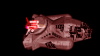
Ich komme nicht weiter. Ich bin soweit, dass ich 2 Sprites über den Bildschirm bewege, doch wenn diese sich überlappen, dann wird das Raumschiff halbtransparent.
Jedoch möchte ich gerne das das Raumschiff kurzzeitig hinter dem Trümmer verschwindet.
Meine GLinit()
GL11.glEnable(GL11.GL_TEXTURE_2D); // Enable Texture Mapping
GL11.glClearColor(0.0f, 0.0f, 0.0f, 0.0f); // Black Background
GL11.glClearDepth(1.0f); // Depth Buffer Setup
GL11.glDisable(GL11.GL_DEPTH_TEST); // Enables Depth Testing
GL11.glDepthMask(false);
GL11.glMatrixMode(GL11.GL_PROJECTION); // Select The Projection Matrix GL11.glLoadIdentity(); // Reset The Projection Matrix
GL11.glOrtho(0, SCREEN_WIDTH, SCREEN_HEIGHT, 0, -1, 1);
GL11.glMatrixMode(GL11.GL_MODELVIEW);
GL11.glEnable(GL11.GL_BLEND);
GL11.glBlendFunc(GL11.GL_SRC_ALPHA, GL11.GL_ONE);
Meine GLSpriteDraw:
GL11.glPushMatrix();
GL11.glLoadIdentity();
GL11.glBindTexture(GL11.GL_TEXTURE_2D, textures[0].getTextureId() );
GL11.glTranslatef(position.x,position.y,Screen.DEFAULT_Z);
GL11.glRotatef(this.rotation,0f,0f,1f);
GL11.glColor3f(1,1,1);
GL11.glBegin(GL11.GL_QUADS);
{
GL11.glTexCoord2f(textureRight,textureUp); //Upper right
GL11.glVertex2f(width, -height);
GL11.glTexCoord2f(textureLeft,textureUp); //Upper left
GL11.glVertex2f(-width, -height);
GL11.glTexCoord2f(textureLeft,textureDown); //Lower left
GL11.glVertex2f(-width,height);
GL11.glTexCoord2f(textureRight,textureDown); // Lower right
GL11.glVertex2f(width,height);
}
GL11.glEnd();
GL11.glPopMatrix();
Kann jemand einen Fehler entdecken?
Ich habe irgendwas gehört, dass die PNG-Image Lademethode unter MacOS Java 1.6 buggy sein soll. könnte es vielleicht daran liegen?
Ich komme nicht weiter. Ich bin soweit, dass ich 2 Sprites über den Bildschirm bewege, doch wenn diese sich überlappen, dann wird das Raumschiff halbtransparent.
Jedoch möchte ich gerne das das Raumschiff kurzzeitig hinter dem Trümmer verschwindet.
Meine GLinit()
GL11.glEnable(GL11.GL_TEXTURE_2D); // Enable Texture Mapping
GL11.glClearColor(0.0f, 0.0f, 0.0f, 0.0f); // Black Background
GL11.glClearDepth(1.0f); // Depth Buffer Setup
GL11.glDisable(GL11.GL_DEPTH_TEST); // Enables Depth Testing
GL11.glDepthMask(false);
GL11.glMatrixMode(GL11.GL_PROJECTION); // Select The Projection Matrix GL11.glLoadIdentity(); // Reset The Projection Matrix
GL11.glOrtho(0, SCREEN_WIDTH, SCREEN_HEIGHT, 0, -1, 1);
GL11.glMatrixMode(GL11.GL_MODELVIEW);
GL11.glEnable(GL11.GL_BLEND);
GL11.glBlendFunc(GL11.GL_SRC_ALPHA, GL11.GL_ONE);
Meine GLSpriteDraw:
GL11.glPushMatrix();
GL11.glLoadIdentity();
GL11.glBindTexture(GL11.GL_TEXTURE_2D, textures[0].getTextureId() );
GL11.glTranslatef(position.x,position.y,Screen.DEFAULT_Z);
GL11.glRotatef(this.rotation,0f,0f,1f);
GL11.glColor3f(1,1,1);
GL11.glBegin(GL11.GL_QUADS);
{
GL11.glTexCoord2f(textureRight,textureUp); //Upper right
GL11.glVertex2f(width, -height);
GL11.glTexCoord2f(textureLeft,textureUp); //Upper left
GL11.glVertex2f(-width, -height);
GL11.glTexCoord2f(textureLeft,textureDown); //Lower left
GL11.glVertex2f(-width,height);
GL11.glTexCoord2f(textureRight,textureDown); // Lower right
GL11.glVertex2f(width,height);
}
GL11.glEnd();
GL11.glPopMatrix();
Kann jemand einen Fehler entdecken?
Ich habe irgendwas gehört, dass die PNG-Image Lademethode unter MacOS Java 1.6 buggy sein soll. könnte es vielleicht daran liegen?