

Hallo zusammen,
seit heute morgen versuche ich mich in LWJGL ein zu arbeiten.
Im Grunde bekomme ich alles so hin, wie ich es gerne hätte, nur meine Texturen...
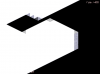
Anbei mal ein Screenshot.
Man sieht, dass das meißte Weiß ist; am Rand sieht man graume Mauern.
Es scheint so, als ob sich die Texturen überlagern, ich hätte es aber gerne, dass sie sich gegenseitig übermalen...
Hier mal ein bisschen Code, der vielleicht helfen könnte: (Vieles davon ist zusammen Kopiert)
So lade ich meine Texturen:
So male ich meine Texturen:
Vielleich hätte jemand eine Idee??
Wäre echt super, denn ich weiß langsam nicht mehr weiter.
MfG
Ivan
seit heute morgen versuche ich mich in LWJGL ein zu arbeiten.
Im Grunde bekomme ich alles so hin, wie ich es gerne hätte, nur meine Texturen...
Anbei mal ein Screenshot.
Man sieht, dass das meißte Weiß ist; am Rand sieht man graume Mauern.
Es scheint so, als ob sich die Texturen überlagern, ich hätte es aber gerne, dass sie sich gegenseitig übermalen...
Hier mal ein bisschen Code, der vielleicht helfen könnte: (Vieles davon ist zusammen Kopiert)
So lade ich meine Texturen:
Java:
	public TextureLoader() {
		glAlphaColorModel = new ComponentColorModel(ColorSpace
				.getInstance(ColorSpace.CS_sRGB), new int[] { 8, 8, 8, 8 },
				true, false, ComponentColorModel.TRANSLUCENT,
				DataBuffer.TYPE_BYTE);

		glColorModel = new ComponentColorModel(ColorSpace
				.getInstance(ColorSpace.CS_sRGB), new int[] { 8, 8, 8, 0 },
				false, false, ComponentColorModel.OPAQUE, DataBuffer.TYPE_BYTE);
	}

	public void init() {
		try {
			textures[IEntity.TILE_WALL] = getTexture("Data/tile_wall.png",
					GL11.GL_TEXTURE_2D, GL11.GL_RGBA, GL11.GL_LINEAR,
					GL11.GL_LINEAR);
		} catch (Exception e) {
			e.printStackTrace();
		}
	}
	/**
	 * Load a texture into OpenGL from a image reference on disk.
	 *
	 * @param resourceName
	 *            The location of the resource to load
	 * @param target
	 *            The GL target to load the texture against
	 * @param dstPixelFormat
	 *            The pixel format of the screen
	 * @param minFilter
	 *            The minimising filter
	 * @param magFilter
	 *            The magnification filter
	 * @return The loaded texture
	 * @throws IOException
	 *             Indicates a failure to access the resource
	 */
	public Texture getTexture(String resourceName, int target,
			int dstPixelFormat, int minFilter, int magFilter)
			throws IOException {
		int srcPixelFormat = 0;

		// create the texture ID for this texture

		int textureID = createTextureID();
		Texture texture = new Texture();

		// bind this texture

		GL11.glBindTexture(target, textureID);

		BufferedImage bufferedImage = loadImage(resourceName);
		texture.setTextureId(textureID);
		texture.setTextureWidth(bufferedImage.getWidth());
		texture.setTextureHeight(bufferedImage.getHeight());

		if (bufferedImage.getColorModel().hasAlpha()) {
			srcPixelFormat = GL11.GL_RGBA;
		} else {
			srcPixelFormat = GL11.GL_RGB;
		}

		// convert that image into a byte buffer of texture data

		ByteBuffer textureBuffer = convertImageData(bufferedImage, texture);

		if (target == GL11.GL_TEXTURE_2D) {
			GL11.glTexParameteri(target, GL11.GL_TEXTURE_MIN_FILTER, minFilter);
			GL11.glTexParameteri(target, GL11.GL_TEXTURE_MAG_FILTER, magFilter);
		}

		// produce a texture from the byte buffer

		GL11.glTexImage2D(target, 0, dstPixelFormat, get2Fold(bufferedImage
				.getWidth()), get2Fold(bufferedImage.getHeight()), 0,
				srcPixelFormat, GL11.GL_UNSIGNED_BYTE, textureBuffer);

		return texture;
	}
/**
	 * Convert the buffered image to a texture
	 *
	 * @param bufferedImage
	 *            The image to convert to a texture
	 * @param texture
	 *            The texture to store the data into
	 * @return A buffer containing the data
	 */
	@SuppressWarnings("unchecked")
	private ByteBuffer convertImageData(BufferedImage bufferedImage,
			Texture texture) {
		ByteBuffer imageBuffer = null;
		WritableRaster raster;
		BufferedImage texImage;

		int texWidth = 2;
		int texHeight = 2;

		// find the closest power of 2 for the width and height

		// of the produced texture

		while (texWidth < bufferedImage.getWidth()) {
			texWidth *= 2;
		}
		while (texHeight < bufferedImage.getHeight()) {
			texHeight *= 2;
		}

		texture.setTextureHeight(texHeight);
		texture.setTextureWidth(texWidth);

		// create a raster that can be used by OpenGL as a source
		// for a texture

		if (bufferedImage.getColorModel().hasAlpha()) {
			raster = Raster.createInterleavedRaster(DataBuffer.TYPE_BYTE,
					texWidth, texHeight, 4, null);
			texImage = new BufferedImage(glAlphaColorModel, raster, false,
					new Hashtable());
		} else {
			raster = Raster.createInterleavedRaster(DataBuffer.TYPE_BYTE,
					texWidth, texHeight, 3, null);
			texImage = new BufferedImage(glColorModel, raster, false,
					new Hashtable());
		}

		// copy the source image into the produced image

		Graphics g = texImage.getGraphics();
		g.setColor(new Color(0f, 0f, 0f, 0f));
		g.fillRect(0, 0, texWidth, texHeight);
		g.drawImage(bufferedImage, 0, 0, null);

		// build a byte buffer from the temporary image

		// that be used by OpenGL to produce a texture.

		byte[] data = ((DataBufferByte) texImage.getRaster().getDataBuffer())
				.getData();

		imageBuffer = ByteBuffer.allocateDirect(data.length);
		imageBuffer.order(ByteOrder.nativeOrder());
		imageBuffer.put(data, 0, data.length);
		imageBuffer.flip();

		return imageBuffer;
	}

	/**
	 * Load a given resource as a buffered image
	 *
	 * @param ref
	 *            The location of the resource to load
	 * @return The loaded buffered image
	 * @throws IOException
	 *             Indicates a failure to find a resource
	 */
	private BufferedImage loadImage(String ref) throws IOException {
		System.out.println("Loading image:/" + ref);
		URL url = new File(ref).toURI().toURL();

		if (url == null) {
			throw new IOException("Cannot find: " + ref);
		}

		BufferedImage bufferedImage = ImageIO.read(new BufferedInputStream(
				getClass().getClassLoader().getResourceAsStream(ref)));

		return bufferedImage;
	}
So male ich meine Texturen:
Java:
	private void initGL() {

		GL11.glEnable(GL11.GL_TEXTURE_2D); // Enable Texture Mapping

		GL11.glClearColor(0.0f, 0.0f, 0.0f, 0.0f); // Black Background
		GL11.glClearDepth(1.0f); // Depth Buffer Setup
		GL11.glDisable(GL11.GL_DEPTH_TEST); // Enables Depth Testing
		GL11.glEnable(GL11.GL_BLEND);
		GL11.glDepthMask(false);
		GL11.glMatrixMode(GL11.GL_PROJECTION); // Select The Projection Matrix
		GL11.glLoadIdentity(); // Reset The Projection Matrix

		GLU.gluOrtho2D(-(int) SCREEN_WIDTH / 2, (int) SCREEN_WIDTH / 2,
				(int) -SCREEN_HEIGHT / 2, (int) SCREEN_HEIGHT / 2);

		GL11.glMatrixMode(GL11.GL_MODELVIEW);

		textureLoader = new TextureLoader();
		textureLoader.init();
	}


	void render() {
		GL11.glClear(GL11.GL_COLOR_BUFFER_BIT);
		for (int i = 0; i < entities.size(); i++) {
			entities.get(i).draw();
		}
        }

//Entity.draw:
public void draw() {
		GL11.glLoadIdentity();
		GL11.glTranslatef(position.x, position.y,
				0); // Translate
		GL11.glRotatef(this.rotation, 0f, 0f, 1f);

		GL11.glBindTexture(GL11.GL_TEXTURE_2D, this.texture.getTextureId());

		GL11.glBegin(GL11.GL_QUADS);
		{
			GL11.glTexCoord2f(textureRight, textureUp); // Upper right
			GL11.glVertex2f(width, -height);

			GL11.glTexCoord2f(textureLeft, textureUp); // Upper left
			GL11.glVertex2f(-width, -height);

			GL11.glTexCoord2f(textureLeft, textureDown); // Lower left
			GL11.glVertex2f(-width, height);

			GL11.glTexCoord2f(textureRight, textureDown); // Lower right
			GL11.glVertex2f(width, height);
		}
		GL11.glEnd();
	}
Vielleich hätte jemand eine Idee??
Wäre echt super, denn ich weiß langsam nicht mehr weiter.
MfG
Ivan
Anhänge
Zuletzt bearbeitet:


